
Samsung Odyssey G9 Review: Why I Replaced Three Monitors With One 49” Ultrawide
July 20, 2026
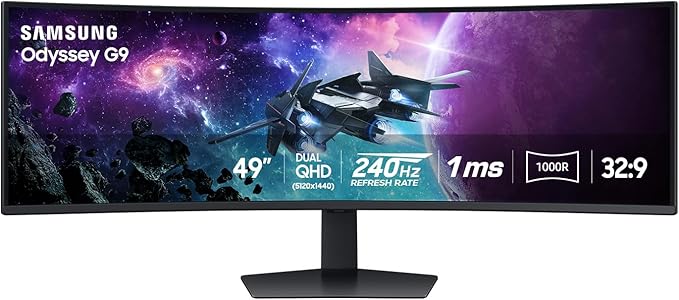
Disclosure: I purchased the Samsung Odyssey G9 myself. This is my honest Samsung Odyssey G9 review based on my personal experience using it as my everyday monitor for software development, productivity, and personal use.
When I first started looking for a new monitor setup, I knew I wanted something different. For years, I had been using three separate 23-inch monitors at my desk.
While having three screens sounds great, the reality was not always perfect. I constantly found myself turning my head left and right, managing multiple cables, and trying to organize my workspace across different displays.
As a software developer, I spend a huge portion of my day looking at code, browsers, terminals, documentation, and multiple applications at the same time. I wanted something that could give me the productivity benefits of multiple monitors while creating a cleaner and more enjoyable workspace.
After making the switch to the Samsung 49” Odyssey G9 (G95C) Series, I can confidently say this has been one of the best upgrades I have made to my setup.
This Samsung Odyssey G9 review covers my experience going from a three-monitor setup to a single 49-inch ultrawide display and why I think this monitor is worth considering for developers, creators, gamers, and anyone who needs serious screen real estate.
Why I Bought the Samsung Odyssey G9
My main reason for buying the Samsung Odyssey G9 was productivity.
I work as a software developer, which means my daily workflow involves having multiple things open at once:
- Code editor
- Browser windows
- Documentation
- Terminal
- Communication apps
- Testing environments
With my old three-monitor setup, I technically had plenty of screen space, but it never felt seamless.
There were several issues:
- Too many cables
- Multiple monitor stands taking up desk space
- Different screen qualities
- Constantly looking side to side
- Difficulty organizing windows
The Samsung Odyssey G9 solved most of those problems.
Instead of having three separate monitors, I now have what feels like four screens built into one massive display.
I can easily have multiple applications open at the same time without constantly switching between windows.
For productivity, the difference is noticeable.
My Samsung Odyssey G9 Review After Daily Use
After using this monitor every day, the biggest thing I noticed was how much better the overall experience feels.
The screen size is impressive, but what really makes the difference is how everything feels connected.
With traditional multi-monitor setups, there are always gaps between screens. Your eyes and attention constantly move between different panels.
With the 49-inch ultrawide display, everything is directly in front of me.
It feels more natural.
For long coding sessions, this has been a huge improvement because I am not constantly twisting and turning to look at different monitors.
The 1000R Curve Is Better Than I Expected
When I first saw the 1000R curve, I honestly thought it might be too aggressive.
I was worried that such a curved screen would feel strange or uncomfortable.
That has not been my experience.
The curve is actually one of my favorite parts of this monitor.
Because the display wraps around your field of view, it reduces the need to constantly move your head from side to side.
With my old three-monitor setup, I was always looking left and right.
With the Samsung Odyssey G9, everything feels positioned naturally in front of me.
It took very little time to adjust, and now a traditional flat monitor setup feels small in comparison.
Productivity and Window Management
The built-in snapping features are useful, but where this monitor really shines is when paired with additional software.
Since I use a Mac, I use a third-party application called Rectangle Pro for window management.
Rectangle Pro works extremely well with this monitor and makes organizing multiple applications incredibly easy.
I can quickly arrange my workspace into different sections and create a workflow that feels almost like having multiple monitors built into one.
For developers, this is where the Samsung Odyssey G9 really stands out.
Having your code, browser, terminal, and documentation visible at the same time improves focus and reduces unnecessary window switching.
Display Quality and Eye Comfort
Since I spend hours every day looking at this monitor, display quality and comfort were important to me.
The Samsung Odyssey G9 delivers a great viewing experience.
The image quality is excellent, text looks sharp, and I have not experienced the eye strain I was worried about when moving to such a large display.
The screen feels premium, which is expected from Samsung.
This does not feel like simply buying a bigger monitor. It feels like upgrading your entire workspace.
Gaming Experience on the Samsung Odyssey G9
While I primarily purchased this monitor for work, there is no question that it would be an incredible gaming monitor.
With features like:
- 240Hz refresh rate
- 1ms response time
- Ultrawide immersive display
- HDR support
- AMD FreeSync Premium Pro
gamers will appreciate what this monitor offers.
The 49-inch curved display creates a level of immersion that traditional monitors cannot match.
Even though gaming was not my main reason for buying it, this monitor is clearly designed to handle both productivity and entertainment.
The Biggest Disappointment: Getting 240Hz on Mac
The biggest issue I ran into was trying to get the full 240Hz refresh rate while using my MacBook setup.
My current setup includes:
- MacBook Pro
- Kensington SD4750P USB-C DisplayLink Docking Station
Unfortunately, I have only been able to get the monitor running at 60Hz.
I also tried connecting directly with an 8K-rated cable that should support higher refresh rates, but I still could not get the full refresh rate working.
I am not sure if this is due to my specific Mac hardware, docking station limitations, or compatibility issues.
I do wish there was better documentation available for Mac users trying to achieve higher refresh rates.
That said, for my primary use case — software development — 60Hz is completely acceptable.
Coding does not require 240Hz, and the productivity improvements far outweigh this limitation.
If you are buying this specifically for gaming, I would recommend researching your exact hardware setup first.
Is the Samsung Odyssey G9 Worth It?
After using it every day, my answer is yes.
This is not an inexpensive monitor, but you are also not buying a standard display.
You are buying a monitor that can replace a multi-monitor setup while giving you:
- Cleaner desk setup
- Fewer cables
- Better workflow
- More immersive experience
Samsung has a strong reputation for displays, and this feels like a product built to last.
There are different versions and panel types available, so buyers should research which model fits their needs.
For me, this monitor has been perfect for my everyday work.
Who Should Buy the Samsung Odyssey G9?
Software Developers and Programmers
If you spend hours coding every day, the amount of screen space is a major advantage.
Engineers
Anyone working with multiple applications, dashboards, or technical programs will benefit.
Content Creators
Video editors, designers, and creators can take advantage of the massive workspace.
Gamers
The immersive ultrawide experience makes gaming feel completely different.
Stock Traders
Having multiple charts and applications visible at once can improve workflow.
Anyone Replacing Dual or Triple Monitors
If you currently use multiple monitors and want something cleaner, this is worth considering.
Samsung Odyssey G9 Pros and Cons
Pros
✅ Massive 49-inch workspace
✅ Replaced my three-monitor setup
✅ Excellent 1000R curve
✅ Premium build quality
✅ Great display quality
✅ Less cable clutter
✅ Excellent multitasking experience
✅ Great for productivity and gaming
Cons
❌ Expensive compared to traditional monitors
❌ Mac refresh rate compatibility can be complicated
❌ Requires a large desk
❌ Takes some time to adjust to the size
Final Thoughts: My Samsung Odyssey G9 Review
After making the jump from three 23-inch monitors to one 49-inch ultrawide display, I can confidently say this was the right decision for my workflow.
The Samsung Odyssey G9 completely changed my desk setup.
My workspace is cleaner, my productivity is better, and I no longer feel like I am constantly looking between multiple screens.
For software development, productivity, gaming, and anyone who spends a significant amount of time in front of a computer, this monitor is an incredible upgrade.
My only recommendation is to make sure your hardware setup can support the features you want, especially if you are using a Mac and trying to achieve the full refresh rate.
For me, the Samsung Odyssey G9 has been worth every penny.
Final Rating: 9.5/10
Is the Samsung Odyssey G9 good for coding?
Yes. The Samsung Odyssey G9 is excellent for coding because it provides enough screen space to have your editor, browser, terminal, and documentation open simultaneously.
Is the Samsung Odyssey G9 worth the money?
In my experience, yes. If you value productivity, multitasking, gaming, or replacing multiple monitors, the Samsung Odyssey G9 is worth considering.
Can the Samsung Odyssey G9 replace three monitors?
Yes. The 49-inch ultrawide display provides enough workspace to replace a traditional multi-monitor setup.
Is the Samsung Odyssey G9 good for Mac?
It works with Mac, but users should research their specific setup if they want higher refresh rates. My MacBook and docking station setup currently runs it at 60Hz, which is sufficient for development work.